> For the complete documentation index, see [llms.txt](https://docs.irs.systems/llms.txt). Markdown versions of documentation pages are available by appending `.md` to page URLs; this page is available as [Markdown](https://docs.irs.systems/ltt/documentation/ltt-gui-manual/lttgui/dialogs/f10testparameterconfiguration/operationmodemappings.md).
# Operation Mode Mappings
You can add an **operation mode mapping** by pressing the button in the operation mode mapping section of the F10 dialog.
{% hint style="info" %}
You need a password to add or remove operation mode mappings. Ask IRS for the password.
{% endhint %}
{% hint style="info" %}
You need to load your [testplan](/ltt/documentation/ltt-gui-manual/teststand.md) before you can map to [operation modes](/ltt/documentation/ltt-gui-manual/teststand/operationmodes.md) of that testplan.
{% endhint %}

Each operation mode mapping consists of **1 to 8 round TCC input indicators** and a **drop down box**. The TCC input indicators represent the value of the [TCC hardware](/ltt/documentation/ltt-gui-manual/lttgui/hwcontrol/tcc-control-gui.md) (or the simulated one).
{% hint style="info" %}
The displayed **TCC input indicators** for each group are determined by the TCC mask, which is defined in the [project wizard](/ltt/documentation/ltt-gui-manual/lttgui/dialogs/f3projectwizard/testgroupsconfiguration.md). If you move your mouse cursor over such an indicator, a tooltip appears, showing the TCC indicator index. The index goes from 1 to 8 (left to right).
{% endhint %}
In the drop down box you can select an operation mode sequence from the currently loaded testplan. You can add as many operation mode sequences as you want and select a corresponding **TCC input pattern** (like binary). You even can have multiple TCC patterns map to the same OM sequence. You should avoid, however, using the same TCC pattern for more than one OM.
{% hint style="info" %}
With an operation mode mapping, you **map** a certain **TCC input pattern** to a single **operation mode sequence** of your testplan.
{% endhint %}
Once you have configured your TCC operation mode mappings you can run your testplan and it will execute that operation mode sequence, which is configured for the current TCC value.
{% hint style="info" %}
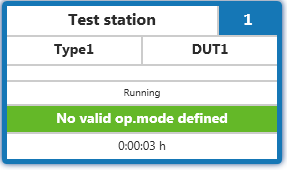
You can see the currently mapped operation mode in the main window's [group display](/ltt/documentation/ltt-gui-manual/lttgui/mainwindow/groupdisplay.md). If this display is empty, no valid mapping exists for the current TCC value and the testplan will execute a fallback sequence.
 {% endhint %}
The main window will display a warning message if there is no valid operation mode mapping at all and you are not allowed to start the loaded testplan.

This can happen if you
* have not configured any mapping yet
* changed the name of the operation mode sequence or deleted the sequence
[go to initial setup guide](/ltt/documentation/ltt-gui-manual/gettingstarted/initial-setup-guide.md#SETUP_GUIDE)
---
# Agent Instructions
This documentation is published with GitBook. GitBook is the documentation platform designed so that both humans and AI agents can read, navigate, and reason over technical content effectively. Learn more at gitbook.com.
## Querying This Documentation
If you need additional information that is not directly available in this page, you can query the documentation by asking a question.
Perform an HTTP GET request on the following URL with the `ask` and `goal` query parameters:
```
GET https://docs.irs.systems/ltt/documentation/ltt-gui-manual/lttgui/dialogs/f10testparameterconfiguration/operationmodemappings.md?ask=&goal=
```
`ask` is the immediate question: it should be specific, self-contained, and written in natural language.
`goal` is what the user is ultimately trying to achieve, the reason they need the answer. Sharing it helps GitBook give you a better, more relevant answer. A goal is most helpful when it describes the outcome the user wants rather than restating the question. For example, with `ask=how do I create an API token`, a goal like `automate deployments from our CI pipeline` lets GitBook tailor the answer to that use case.
The response will contain a direct answer to the question and relevant excerpts and sources from the documentation.
Use this mechanism when the answer is not explicitly present in the current page, you need clarification or additional context, or you want to retrieve related documentation sections.
{% endhint %}
The main window will display a warning message if there is no valid operation mode mapping at all and you are not allowed to start the loaded testplan.

This can happen if you
* have not configured any mapping yet
* changed the name of the operation mode sequence or deleted the sequence
[go to initial setup guide](/ltt/documentation/ltt-gui-manual/gettingstarted/initial-setup-guide.md#SETUP_GUIDE)
---
# Agent Instructions
This documentation is published with GitBook. GitBook is the documentation platform designed so that both humans and AI agents can read, navigate, and reason over technical content effectively. Learn more at gitbook.com.
## Querying This Documentation
If you need additional information that is not directly available in this page, you can query the documentation by asking a question.
Perform an HTTP GET request on the following URL with the `ask` and `goal` query parameters:
```
GET https://docs.irs.systems/ltt/documentation/ltt-gui-manual/lttgui/dialogs/f10testparameterconfiguration/operationmodemappings.md?ask=&goal=
```
`ask` is the immediate question: it should be specific, self-contained, and written in natural language.
`goal` is what the user is ultimately trying to achieve, the reason they need the answer. Sharing it helps GitBook give you a better, more relevant answer. A goal is most helpful when it describes the outcome the user wants rather than restating the question. For example, with `ask=how do I create an API token`, a goal like `automate deployments from our CI pipeline` lets GitBook tailor the answer to that use case.
The response will contain a direct answer to the question and relevant excerpts and sources from the documentation.
Use this mechanism when the answer is not explicitly present in the current page, you need clarification or additional context, or you want to retrieve related documentation sections.